

Looking into MAC addresses and how important they are
MAC, which stands for “Media Access Control,” is a key indicator. It makes the registered numbers of different device manufacturers stand out, which is important for making sure that devices work well with networks.
Why MAC addresses are important for MAG devices
Each MAG device has its own MAC address, which is kind of like a digital fingerprint. This address is very important and needs to be registered on the servers of IPTV providers.
Setting up connections with IPTV providers
You can get an easy-to-use dashboard from some IPTV providers. Managing IPTV subscriptions is easy with this dashboard, which lets you do things like add MAC addresses. In cases where there is no dashboard, users need to get help from their IPTV provider.
Taking care of MAG devices’ MAC addresses
Dealing with Changes in Devices
In order for users to switch MAG devices, the old MAC address must be replaced with the new one on the servers through the transition. This makes sure that service and connectivity don’t go down.
For MAG, how do I set up IPTV?
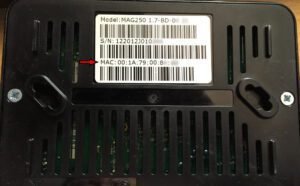
A simple move is all it takes to find out your MAG box’s MAC address. After turning the box over, On the back of your device, you can find the MAC address. The first character is usually 00:1A:79, and the rest of the characters are different for each device.
Thoughts for the End:
For people who use MAG devices, MAC addresses are very important for making sure they can connect and get service without any problems. Users can get the most out of their MAG devices by registering their MAC addresses with IPTV providers and knowing how to handle device changes.
Common Questions:
- What does it mean for MAG devices to have MAC addresses? MAC addresses are unique identifiers for MAG devices that make it easy for them to work with networks.
- How do I keep track of MAG devices’ MAC addresses? Users can control their MAC addresses by letting their IPTV providers know about them and keeping them up to date when their devices change.
- How do I get my MAG device’s MAC address? If you turn the MAG device over, you can usually find the MAC address on the back of it.
- What do I do if my IPTV provider doesn’t give me a way to manage my MAC addresses? When this happens, users should talk to their IPTV provider about how to handle MAC addresses.
- Why is it important to change the old MAC address to the new one when you switch MAG devices? When switching to a new MAG device, changing the MAC address makes sure that connectivity and service don’t stop.
- Apple iPhone, MAG boxes, MAG device, MAG portal, and MAC address
- This was helpful to 0 people.
 IPTVSKYPRO