

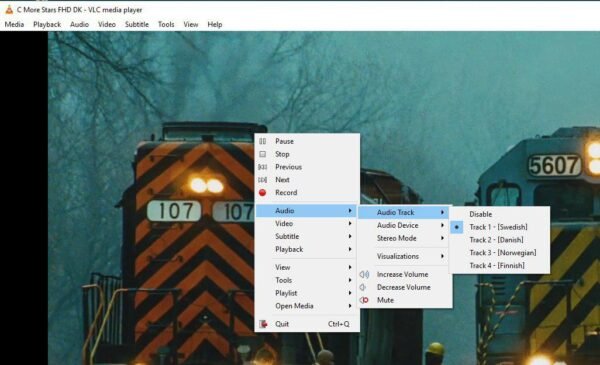
How can I alter the audio on a VLC channel?
One may occasionally run into a situation where the channels being accessed on a VLC media player offer a wide variety of audio options. In particular, there are multiple language options available on the Nordic channels, giving the audience the freedom to choose from a wide range of languages. Take the wide range of linguistic repertoire that is available to oneself, for example. How can I use VLC to watch IPTV?
How to switch the audio channel
A “Right click” must be made exactly in the middle of the screen in order to change the audio channel. Following that, select “Audio Track” under the “Audio” tab, as shown in the above visual aid. This is where you can specify your preferred language, which will help the audio channel change. How can I get the most out of my VLC to watch IPTV?
Please share your thoughts in the comments section below if you think we have missed any important details. Much obliged.