

Formuler Z boxes are superior devices for accessing IPTV content. The primary advantage of FormulerZ boxes is their compatibility with both MAC-based Portal Systems and M3U-based Playlists. After the successful launches of the Formuler Z8 and Formuler Z10 boxes, the newest entry in the series is the Formuler Z11 set-top box. The Formuler Z11 is recognised as a superior IPTV set-top box in comparison to the Formuler Z10, featuring several significant distinctions:
The Formuler Z11 features a more rapid processor compared to the Formuler Z10. The Z11 is equipped with a quad-core processor, whereas the Z10 utilises a dual-core processor.
The Formuler Z11 features superior memory capacity compared to the Formuler Z10. The Z11 features 2GB of RAM, exceeding the Z10’s 1GB provision.
The Formuler Z11 surpasses the Formuler Z10 in storage capacity. The Z11 features 16GB of internal storage, twice the Z10’s 8GB capacity.
Connectivity: The Formuler Z11 provides a broader range of connectivity options than its predecessor, the Formuler Z10. The Z11 accommodates Gigabit Ethernet, whereas the Z10 is restricted to Fast Ethernet. Additionally, the Z11 incorporates dual-band Wi-Fi, representing a significant enhancement over the Z10’s single-band Wi-Fi functionality.
The Formuler Z11 is distinguished by its support for HDR (High Dynamic Range), which enables a wider colour gamut and enhanced contrast relative to the Formuler Z10.
Methods for integrating IPTV channels into your Formuler Z11
This tutorial is applicable to all Formuler box models featuring MYTV online3.
For the latest generation of Formuler boxes, including the Formuler Z11, the MAC address necessary for your IPTV provider must commence with 00:3F:E8:XX:XX:XX. For older models such as the Formuler Z7 and Z8, it is necessary to alter the MAC ID to a MAC address commencing with 00:2F:23:XX:XX:XX.
Kindly click here to acquire further information on configuring the Forumler box Z7.
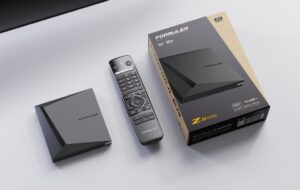
Step 1: The pre-installed application for IPTV on the Formuler Z11 is “MYTV Online 3”.
Launch this application.
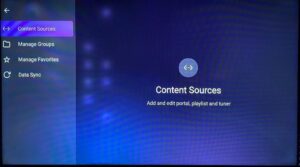
Step 2: Navigate to the Menu, select Content Manager, and click on “Source Manager.”
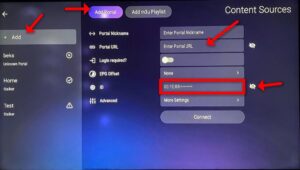
Step 3: To configure your Formuler Z11 box with a portal system, initiate by clicking on “+Add” and subsequently selecting “Add Portal.” Subsequently, identify the ID of your box and click the eye icon to display the complete MAC ID. The MAC ID must be provided to your IPTV provider, who will then incorporate it into the system and furnish you with the Portal URL. Upon receiving the Portal URL, return to this page and enter it appropriately. Verify that the “Login required” setting is disabled. Finally, click on “Connect” in the final step to load the channels.
If you need further assistance, please pose your enquiries in the comments section.
 IPTVSKYPRO