

The M3U inventory describes a textual structure filled with information about the list of channels, including names, the web address of the channel’s origin, and a classification system for channel identification, broken up into many groups based on geopolitical boundaries to make navigation easier. As a result, M3U becomes the most popular format that all IPTV devices use.
Some programs, like “IPTV Smarter” and “GSE Xtream-Codes API,” ask for information about the “Server Address,” “Username,” and “Password” in their settings.
How to setup IPTV Smarters?
How to setup GSE with Xtream-Codes API?
How to find the server address in an M3U URL
According to the M3U URL, figuring out these details is not too hard, but it is a little confusing. In this discussion, we’ll try to explain how easy identification works.
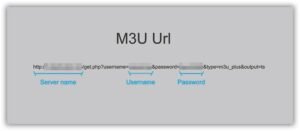
Using the following M3U URL as an example:
http://”Server.Address”/get.php?username=”ABCD“&password=”EFGH“&type=m3u_plus&output=ts
To get important setup information from the M3U URL, you can break it down like this:
- URL of the server: http://”Server.Address”/
- Username: “ABCD”
- Keyword: “EFGH”
In the following narrative, we explain this process in a clear and concise way.
If you need more help or more information, please don’t hesitate to get in touch with us in the section below for comments. We’re here to help you and answer any questions you may have.
 IPTVSKYPRO