


IP Television lets people watch a huge selection of international channels, broadcasters, and Video On Demand (VOD) services on their iPhone, iPad, Apple TV, and other iOS and Android devices, no matter where they are in the world! All you need for this to work smoothly is a stable internet connection!
Click on the link below to get this app:
Android:
https://play.google.com/store/apps/details?id=tv.iptelevision.iptv
iOS:
https://apps.apple.com/app/ip-television-iptv-m3u/id884206090
How to add IPTV channels to the IPTV app
The IPTV app will give you two options for adding IPTV lists: “Manual Load Channels” and “Xtream-Codes Account.” So, open the app first.
Xtream-Codes Account is suggested because it gives you access to extra features and functions.

We will show you both ways in this article.
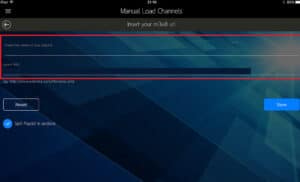
Step 2: If you choose “Manual Load Channels,” do the following:
- 1. Type any name you want in the first box, like “IPTV Playlist.”
- 2. Paste the M3U URL that your IPTV provider gave you into the second box. Usually, you can find this URL in the dashboard of your provider, which you can get to after signing up.

If you pick “Xtream-Codes Account,”
Type a name you’d like to use in the first box.
In the third and fourth boxes, type in the “Username” and “Password” that will work with your M3U line. In the second box, enter the server URL that you got from your M3U line.
Go to your M3U line and find the enterserver URL. Type it into the second box.
A dashboard lets you get to your M3U URL.
Step 3: To see the channel groups, click on the playlist you just added.
Step 4: Pick the channel you want to watch and have fun!
Featured
Because it has an easy-to-use interface and many features, IP Television makes things simple.
- It’s easy to add multiple playlists and manage them well.
- There are four different ways to add channels.
- The Electronic Programme Guide (EPG) can help you.
- And a lot more…
When you have IP TV, you can make or upload all of your own channels and playlists. Its easy-to-use interface makes it simple to control and refresh your playlist.
IP TV has these features:
- Start your channel playlists and take care of them.
- From the menu bar, you can get to Video on Demand.
- Watch your favourite shows.
- Separate your list of channels into sections.
You can tell us what you think about this article in the section below for comments. This will help us make our articles better. Thank you ahead of time.
 IPTVSKYPRO