


“Catch-up” is the process of recording live TV shows and storing them on the server of an Internet Protocol Television (IPTV) provider. This allows viewers to access the content at their convenience after the original airing has concluded.
A few of these gadgets let you change time in other ways, like letting you start watching a recorded show from the beginning, even if the original TV show hasn’t ended yet. Some IPTV service providers send out versions of their shows that are time-shifted, usually by one hour. How do I set up IPTV on a MAG?
We will show you how to use the time-shifting or catch-up feature on your MAG device in this guide.
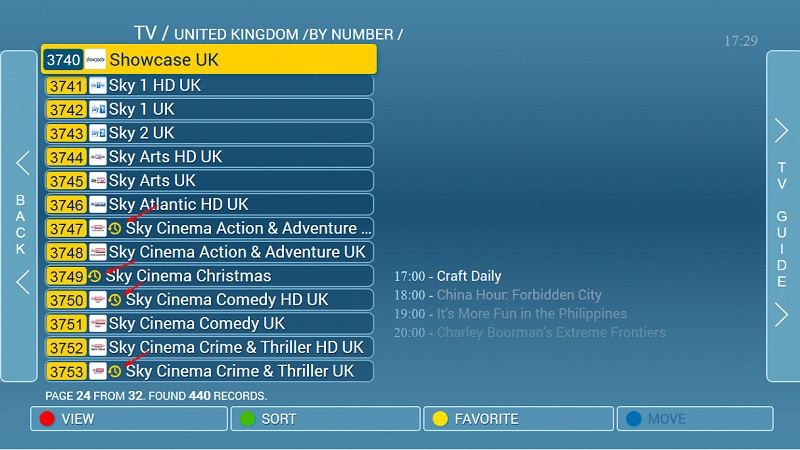
The image below shows that channels that offer catch-up features are marked with a clock icon next to their names.
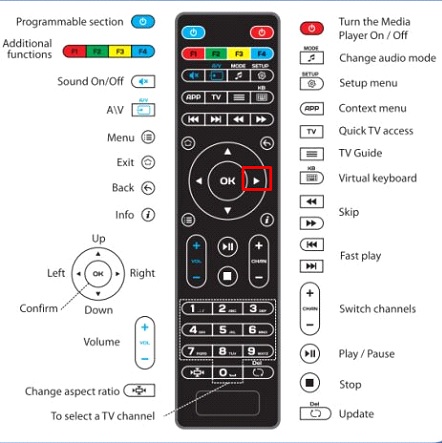
Step 1: To use the catch-up feature to watch a show that you recorded earlier, press the arrow to the right of your remote control to bring up the TV guide.
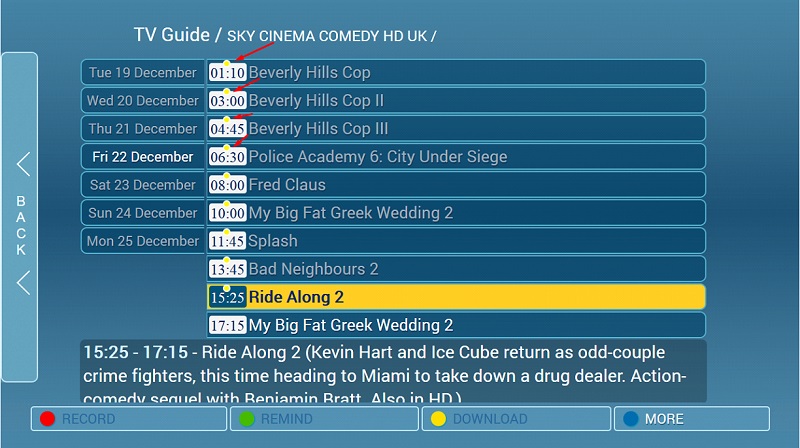
Step 2: When you go to the TV guide, you’ll see that the catch-up content is marked with a bright yellow dot, as shown in the picture below.
[…] from the internet that you get through a cable or internet connection. There are different kinds of IPTV setup boxes on the market, and each one has its own operating system, such as iOS or Android. Boxes like MAG […]
[…] this article, we talked about some of the different features that IPTV Smarters have. For example, you can watch live TV, movies, collections, and TV shows. – The […]