

rIPTV seamlessly integrates an electronic program guide across all channels, making it easy to see what you’re watching right now. It also gives you access to movie times, trailers, photo galleries, and full ratings and information about all the movies you want to see.
Where can I download?
You can get this great app from iTunes by clicking on the link below:
Android:
https://play.google.com/store/apps/details?id=areaengineering.android.mytv
iOS:
https://itunes.apple.com/be/app/riptv/id1060510958#?platform=iphone
How do I set up IPTV on the rIPTV app?
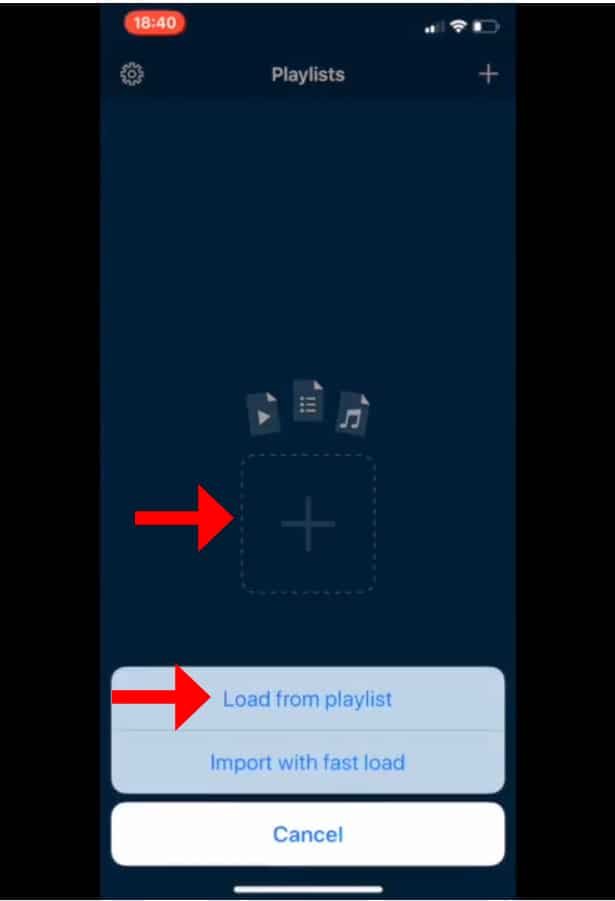
Step 1: Click the “+” button at the bottom of the screen to begin.
Second Step: Give your playlist a name in the first field and enter your M3U URL in the second field. Then click the “Add” button.

Step 3: After putting in the M3U URL, you should see a “Loading” message. After the process of loading is done, you can start watching your IPTV channels on the device you chose.

The main things about rIPTV
- You can turn your iOS device into a portable TV that lets you watch your favorite channels and movies whenever you want, no matter where you are.
- You can easily manage multiple IPTV playlists to suit your different tastes in entertainment.
- Take advantage of iPad Support for multiple tasks at once, so you can easily switch between apps while watching your content.
- Explore an infinite number of channels and scroll through them without stopping to enjoy uninterrupted viewing.
- Unique channel icons make it easy to find channels and improve the visual experience of browsing content.
- Automatically put channels into groups to make them easier to find and browse.
- It’s possible to upload and refresh playlists without having to reload them by hand, which makes sure that the latest content is delivered.
- You can easily find your way around with an interface that is both easy to use and nice to look at.
- Enjoy the freedom to play any file type, not just live streams, which gives you more entertainment options.
- You can access an Electronic Program Guide (EPG) on all channels, which helps you choose what to watch.
- You can take charge of your viewing experience by pausing and playing live TV whenever it suits you.
- You can easily find the shows you want by scrolling through video content without any problems.
- Get detailed information about live TV shows and movies or TV shows that you can watch whenever you want to improve your viewing experience.
- Get movie descriptions and other information from the well-known IMDB database. This will help you learn more about the content that’s out there.
- Before choosing what to watch, you can get a sneak peek at the content by watching ratings and movie trailers.
- For strong and reliable media playback, use technology that is based on VLC.
- Make a list of your favorite channels so that you can quickly and easily get to the content you want.
- Improve functionality with 3D Touch features on devices that support them, which give you more shortcuts and options.
- With the Today Widget, you can easily get to your entertainment options from the home screen of your device.
- You’ll never miss your favorite events again if you set up alerts and reminders.
- Using Spotlight’s search function, you can quickly find the programs you want.
- Make sure it works with iOS9 and later so that a lot of people can use it on a lot of different devices.
Please feel free to ask any questions you have in the comments section if you need any more help.
[…] I change how my EPG looks and how it’s laid out? Most EPG interfaces let users change settings like colour schemes, font sizes, and display preferences to make them more or less how they want […]