How can one configure the BuzzTV Box for use with IPTV?
The BuzzTV is packaged in a nondescript black box that appears minimalist yet exhibits some intricate detailing. The “BuzzTV” logo is centrally positioned at the top of the box. The entire front is adorned with ebony, beneath which lies a treasure trove of information regarding its numerous functions and included features. The BuzzTV, equipped with an integrated Android operating system, functions as both a television and a set-top box emulator.
An M3U playlist is compatible with the BuzzTV setup box. One can obtain an application such as GSE or Perfect Player from the Google Play Store and incorporate their M3U playlist into it.
Instructions for connecting IPTV to BuzzTV
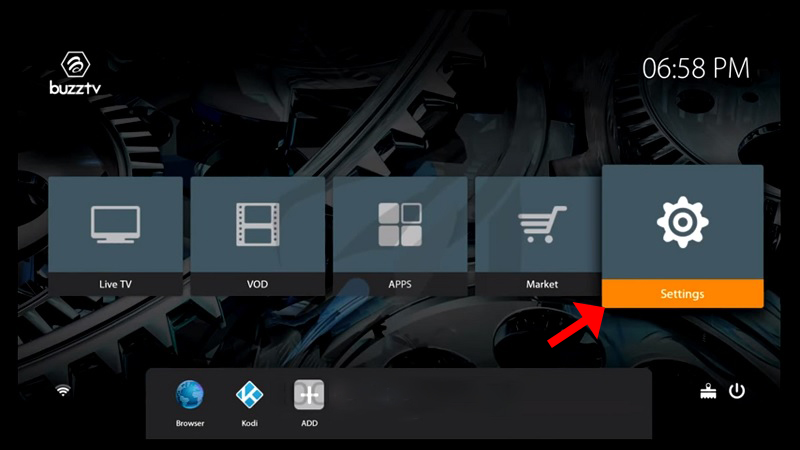
Step 1: Navigate to the main menu and choose “Settings” as depicted in the image below.
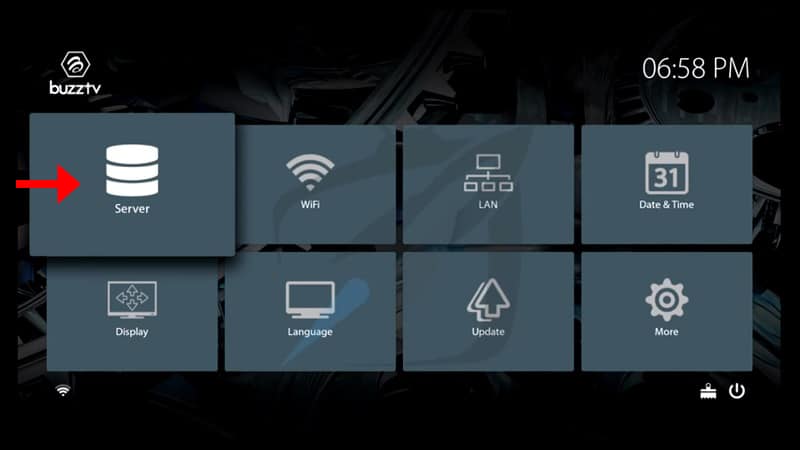
Step 2: Select “Servers” and proceed to the next step.


 IPTVSKYPRO